Tuesday, 3 December 2013

Turn Your Webcam into a Spy Cam


Turn Your Webcam into a Spy Cam

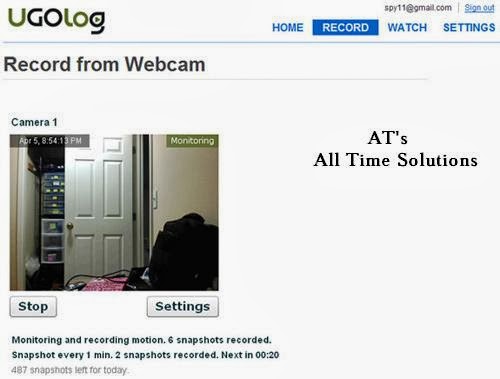
You can now easily monitor your room, office or workplace for activities going on during your absence without having to invest on expensive hidden cameras. If you’ve ever wondered to find a way to turn your PC webcam into a spy camera, here is a simple and effective solution. This can be really handy to monitor your children and pets in home or even catch a cheating spouse red handed! For this, all you need is a computer with an Internet connection and a webcam attached to it.
If your computer meets the above simple requirements, then you are all set to go. The site called UGOlog.com provides a free solution to simply transform your webcam into a powerful spy camera in just a few steps. You can sign-up for a free account and start using the service immediately.
Since UGOlog service runs as a web application from within the browser, there is no need to install any additional software on your computer. That means, when your spouse or children look through the installed programs, they don’t find anything that arouses suspicion.


The following are some of the advantages of using UGOlog service over other software programs or a conventional spy camera:
Firstly, the service comes for free, so that you don’t need to buy anything to start with.
Unlike software programs such as “Webcam Monitor” which is complicated to configure and lacks stealth operation, UGOlog needs no installation and is simple to setup.
UGOlog comes with powerful features such as as motion detection, email alerts, and interval snapshots.
You have the option to view the camera remotely from anywhere just by logging into your UGOlog account.


for more update join us on facebookAT's All Time Solutions


How to protect USB Virus from entering PC?


How to protect USB Virus from entering PC?


Hi friends, i have a sloution for ur issue.
You can make ur normal pen drive to virus
protected pendrive. for that u want 1 pc
which having windows vista 0r 7 os
installed.

Follow the below steps……..

1) Connect ur pen drive to pc which having widows vista or windows 7 operating
system. (The user must having Administrator rights)

2) Open ‘My Computer’ & right click on pendrive icon then select ‘Format’ option.
Before formatting you must take a back up of all of your data because it deletes whole
data from ur pen drive.

3) In Format window select file system tab & change it to ‘NTFS’ then click on ‘Start’
to start formatting.

4) After formatting done close the format window & open ur pendrive.

5) create one folder in pen drive & rename it to ‘secured’.

6) Back to ‘My Computer’ & again right click on pendrive & now select ‘Properties’
tab.

7) In properties window select security tab then click on edit & tick on ‘Deny’ for
‘Write’ permission then press ok to apply the settings.

8)Open pen drive again, right click on
‘Secured’ folder select ‘Properties’ then
‘Security’ tab.
again click on ‘Edit’ tab & set ‘Allow’
permission to ‘Full Control’ then click ok to
apply settings.

9) Open ‘Secured’ folder, create one folder into that & rename it to ‘Secured.exe’.

10) Right click on ‘Secured.exe’ folder select
‘Properties’ & make it hidden by selecting
‘Hidden’ attribute then select ‘security’ tab
click on ‘Edit’ & set ‘Deny’ permission to
‘Full Control’ .

11) Press ‘Ok’ to apply the settings. Now ur pen drive is virus protected. but u
can’t copy files into that directly. u need to copy all of ur files to the secured
folder & I recommand that copy ur software setup files
to the zip folder so, virus can’t access software’s exe files.

for more update join on us on facebook AT's All Time Solutions